
What’s the mess — quick and blunt
Look, mining fleet ops get messy fast: trucks sitting idle, drivers guessing where to go, dispatch yelling over radios — chaos. If you wanna fix that mess, start by speaking the same language. That’s where logistics fleet management terms matter. I’ve seen crews trip over phrases that mean the same thing but get treated like gospel; fix the vocab and you cut half the screw-ups right off the bat.
Common pain points that beg for clear terms
Here’s the usual pain list I spot on job sites and control rooms:- Assignment confusion: “Next available” vs “nearest” vs “highest-priority” — people assume the same rule.- Data lag: telemetry shows last known position, not current status.- Load mismatch: truck capacity and shovel cycle times don’t match.- Dispatch overload: human dispatchers juggling screens, calls, paper notes.Call any of these by the wrong name and watch people make bad calls. You need words that map to actions, not feelings.
Key terms, plain and useful
Use these labels and don’t be slick about it:- Cycle time — how long a truck takes to go from load to dump and back.- Tonnage target — how much material needs moving over a time block.- Availability status — online, offline, in-maintenance, waiting-for-load.- Assignment rule — the algorithm or human rule that picks the next truck (nearest, most-capable, round-robin).When everybody uses these exact words, planning and dispatch stop tripping over each other.
How terms change the tech choices
Call the wrong thing “real-time” and you’ll pick a stack that ain’t fit. Real-time telemetry means sub-30-second updates from units; “near real-time” can be minutes. That distinction dictates what comms hardware you buy and how the UI needs to behave. If your team thinks “real-time” means “sometimes fast,” you’ll buy junk and then blame the software. I’ve run routing experiments where update frequency alone cut idle time by 12%—the metric matters more than pretty maps.
Where dispatch systems and fleet ops collide — features that actually matter
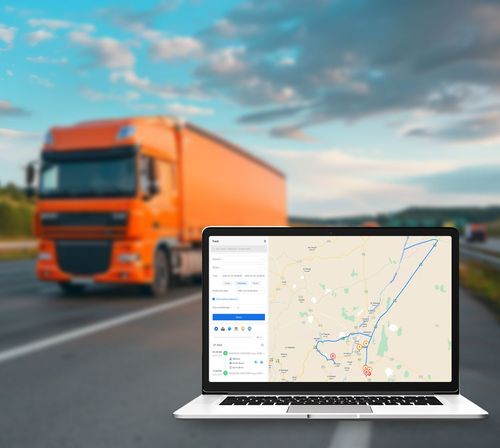
Don’t fall for bells and whistles. These features solve the problems above:- Deterministic assignment rules you can edit on the fly.- Live cycle-time dashboards with historical baselines.- Maintenance flags tied to assignments (so broken trucks don’t get sent).- Simple exception workflows for human overrides.These bits let a dispatcher and an operations manager argue less and get trucks moving more. If the UI hides an assignment rule behind five clicks, it ain’t usable when things get loud.
Common mistakes teams make
People trip on the same stuff:- Mixing vague language with tight SLAs.- Treating GPS pings as truth without checking sensor health.- Designing for perfect conditions, not dust storms and dead spots.- Over-automating assignment without letting humans step in.Avoid those and you’ll keep rollout hiccups manageable.
How software should be evaluated — no fluff
When you test solutions, do these checks:- Can I change the assignment rule in under a minute?- Does the system show last-seen timestamp for every unit?- Can dispatchers push manual overrides that log why?- Is maintenance status automatically removed when a tech marks it repaired?Also watch how the vendor explains system limits — honest vendors tell you where comms or terrain will degrade features. That honesty is rare and valuable. If you’re demoing at trade shows, remember what vendors promise under bright lights and what they do in a dusty pit — the NAFA Fleet Management Association annual conference tends to highlight those gaps.
Alternatives and trade-offs
Quick comparison:- Heavy customization: great fit, long lead time, pricey.- Off-the-shelf focused on mines: faster, fewer weird integrations.- Fleet-agnostic SaaS: cheap and broad, but might miss mining specifics.Pick based on whether you need mine-cycle-aware logic or simple truck routing. And when a vendor mentions “fleet optimization” ask which constraints they actually model: cycle time, bucket size, haul-road speed, weighbridge delays. If they dodge specifics, walk.
Real-world deployment tips
Roll out in bites:- Start with one pit or one shift.- Use familiar terms on screens so crews don’t need a dictionary.- Track a handful of metrics (idle minutes, queued trucks, on-site cycle variance).- Run paired trials: old dispatch vs new rules for the same hour.Those steps keep surprises small and let field teams build trust in the system. Trust beats hype every time.
Where transportation software fits in the stack
Think of the dispatch system as the brain and the rest as supporting muscles. Your telemetry feeds decisions, maintenance data keeps assets honest, and dispatch rules translate strategy to actions. When you shop, look for a system that plays well with your comms, your maintenance tool, and your weighbridge. Solid transportation fleet management software should be flexible enough to respect your site’s quirks, not force you into a fresh playbook.
Wrap-up — keep it simple, call things what they are
Words steer behavior. Nail the vocabulary, pick software that matches those words, and stage the rollout so crews see wins fast. That’s how chaos becomes manageable without turning the control room into a circus. I’ve worked fields where clear terms and honest software choices cut argument time and kept trucks moving; that practical payoff is the point. If you care about a system that handles mining realities and keeps teams aligned, BSJ shows how the terminology ties directly into usable solutions on the ground.